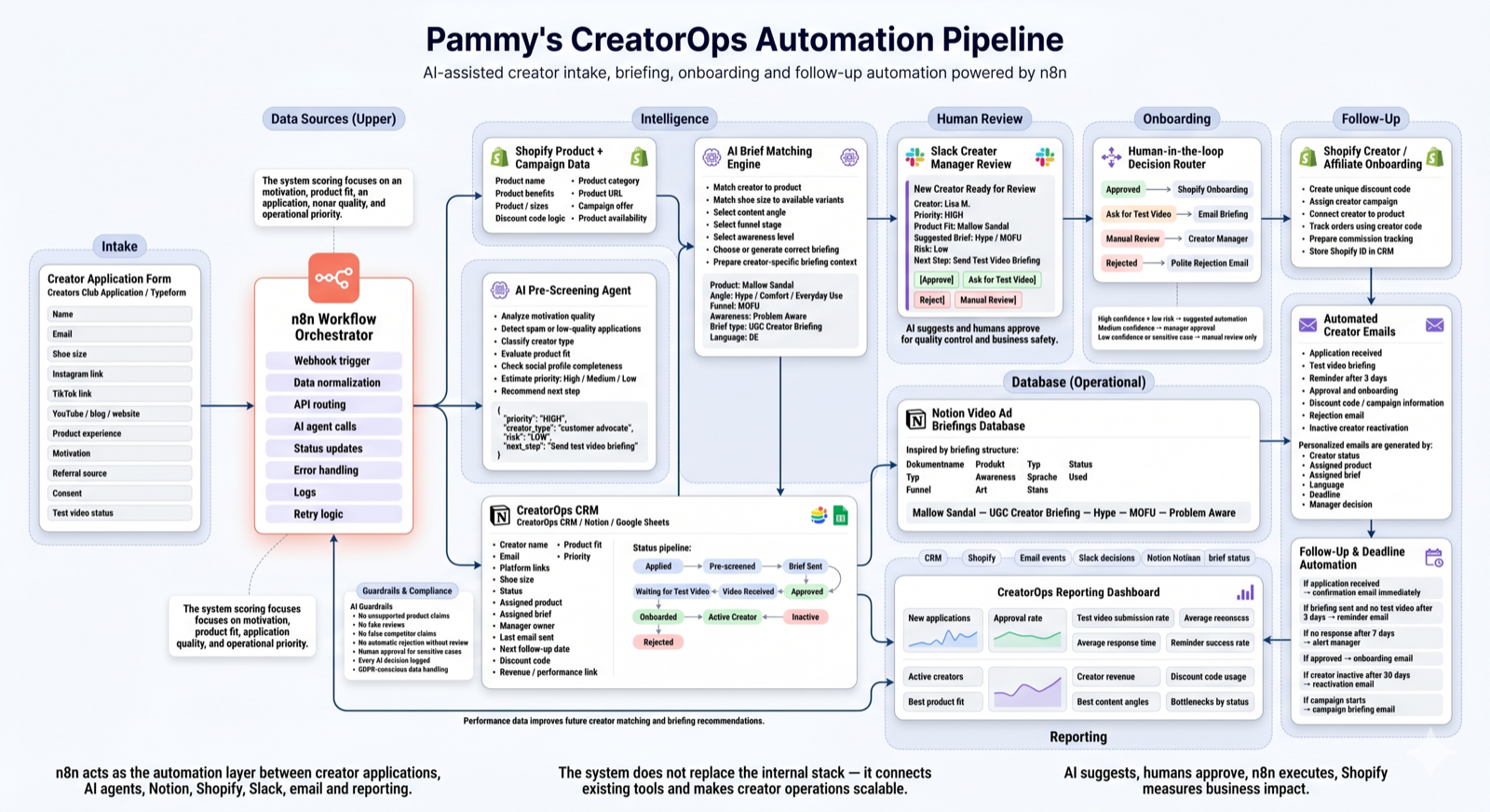
Pammys CreatorOps Automation Pipeline
AI & Automation Engineer interview · June 2026
Public research snapshot — directional signals only
Monthly visits
395K
Customers
1M+
Revenue (est.)
€50–90M
Markets
11
Locales
20+
Team
100+
These figures are directional estimates from public research, not internal company data.
Why this pipeline? — automation hypotheses to validate
The public creator journey suggests several possible automation opportunities: creator intake, review prioritisation, briefing assignment, follow-up reminders and Shopify campaign tracking.
The visible briefing structure suggests that product, angle, funnel stage, awareness level, language and status are important operational fields. This demo explores how an automation layer could connect these fields with creator applications and Shopify product data.
These assumptions are based only on public touchpoints and would need to be validated with the team before implementation.
Core positioning
"I did not build this as a replacement for your internal tools.
I built it as an automation layer that sits on top of what you already use —
Typeform, Notion, Shopify, Slack, email — without changing anything."
The goal is to show how I think: map the process, identify repetitive work, add AI where it helps, keep humans in control, and connect the workflow to revenue data.
Assumptions & Scope
This project is based on publicly accessible touchpoints: the creator application form, visible briefing structures, Shopify sitemap, and the job description. It does not assume access to internal systems. All findings are signals, not conclusions — everything would be validated with the team before any implementation.
Pipeline — 13 steps end to end
Interview focus
Main demo: Creator application → AI pre-screening → CRM → Slack approval → Shopify onboarding → follow-up tracking
Bonus modules (time permitting): SEO engine · Email lifecycle · Revenue tracking · UGC brief generator
Why n8n fits this workflow
n8n is useful here because the workflow crosses multiple tools: form intake, CRM updates, AI calls, Slack approvals, Shopify actions, email sending and scheduled reminders. The value is not one single API call, but reliable orchestration between systems with logs, retries and human approval steps.
60-second demo script (Click to expand)
- A creator submits an application.
- n8n receives the webhook and normalizes the data.
- The AI agent creates a priority score and recommended next step.
- The creator is saved into the CRM with status “Pre-screened”.
- Shopify product data is used to suggest the best product and briefing angle.
- Slack notifies the creator manager with approve / test video / reject / manual review options.
- If approved, the system prepares email onboarding, discount code creation and follow-up reminders.
- Reporting shows bottlenecks, response times and creator revenue potential.
Creator application form
Typeform webhook fires → n8n receives: name, email, shoe size, social links, motivation, product experience, referral, consent, test video status
n8n orchestrator
Receives webhook → normalizes data → validates fields → routes to AI → updates CRM → connects Shopify, Notion, Slack, email → schedules reminders → handles errors
AI pre-screening agent
Analyzes motivation quality, product fit, profile completeness, referral source, spam risk → outputs priority (HIGH/MED/LOW), creator type, risk, recommended next step
Creator CRM
Stored in Notion or Google Sheets with full status pipeline
Shopify product & campaign data
Pulls product name, category, benefits, variants, price, campaign offer, discount logic → provides context for brief matching
AI brief matching engine
Matches creator to product → selects angle (Hype / Fußschmerzen / Fake vs Original) → selects funnel stage (MOFU) → selects awareness level → generates or retrieves briefing
Notion briefing database
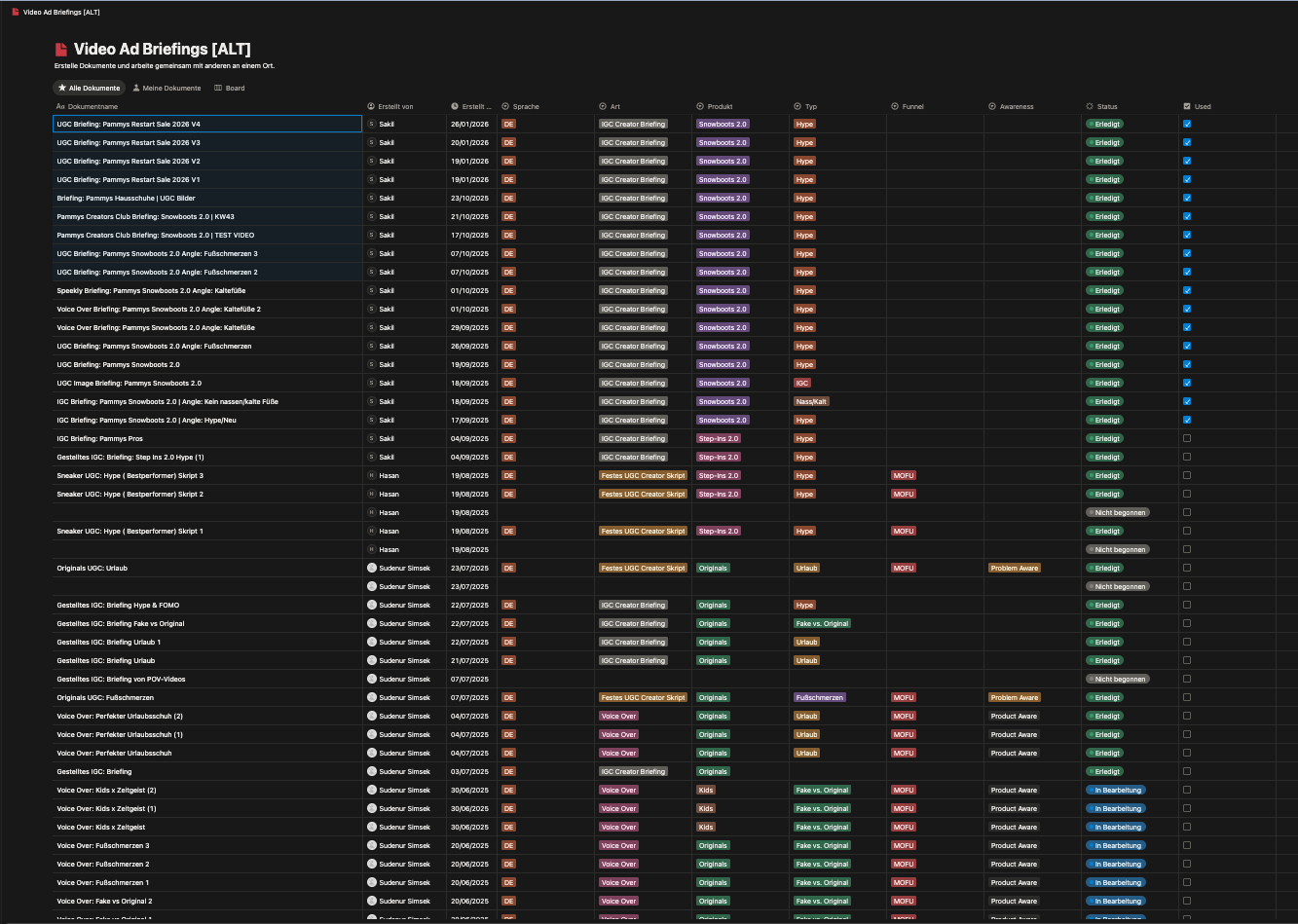
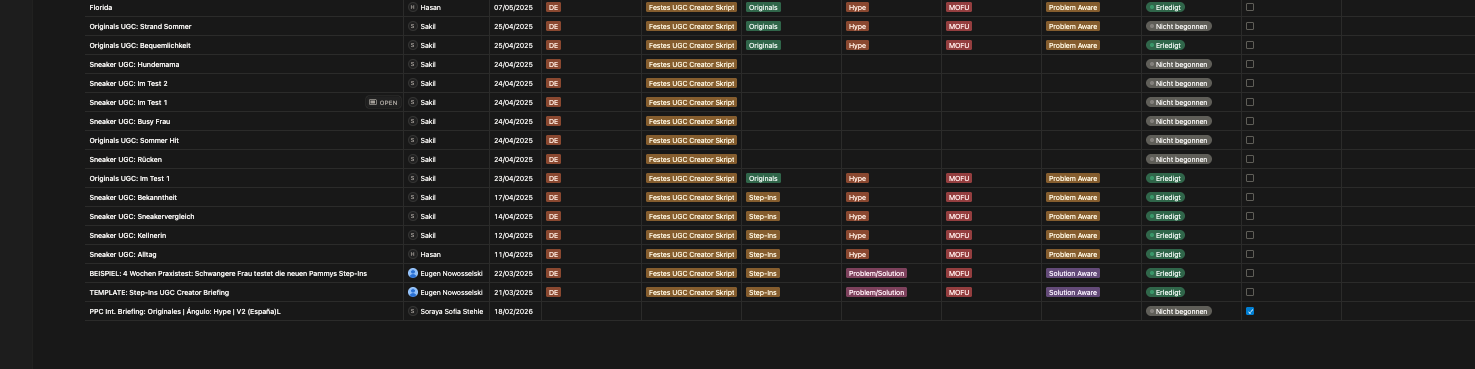
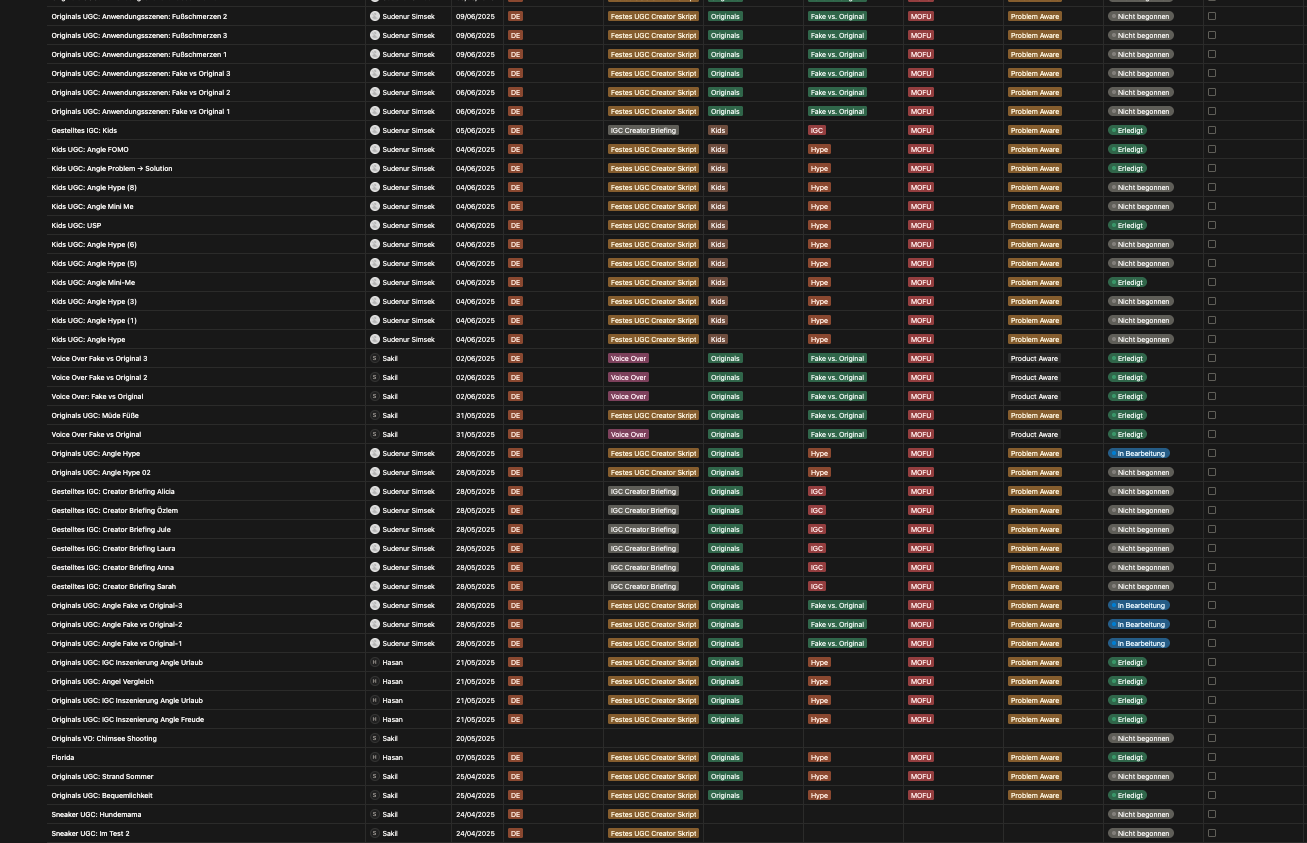
Creates record with: Dokumentname, Produkt, Typ, Funnel, Awareness, Art, Sprache, Status, Used — designed to mirror the visible Video Ad Briefings structure
Slack manager review
Sends structured message to creator manager: creator details, priority, product fit, suggested brief, risk level + action buttons
Human-in-the-loop decision router
High confidence + low risk → suggested automation · Medium → manager approval · Low confidence → manual only. AI never makes the final call on sensitive decisions.
Shopify onboarding
Creates unique discount code (e.g. LISA-MALLOW-15) → assigns creator to campaign → connects to revenue tracking → stores Shopify ID in CRM
Email automation
Status-triggered emails: application received → test video briefing → 3-day reminder → approval + onboarding → discount code → rejection → reactivation. Personalized with product, brief, deadline, language.
Reminder tracking
No briefing response after 3 days → reminder · 7 days → Slack alert to manager · Approved → onboarding email · 30 days inactive → reactivation email
Reporting dashboard
Tracks: applications, approval rate, video submission rate, response time, active creators, revenue per creator, discount code usage, best angles → feeds back into brief matching engine
SEO & content engine (bonus layer)
Alt text repair candidate
Detect missing or weak alt text across Shopify locales → generate localized suggestions → send to review queue → prepares Shopify update drafts for approval (publish only after human approval).
Blog content generation
New product triggers localized blog article drafts in DE, EN-GB, FR, NL, SV, DA — comparison-style content ideas can be generated for review, but no competitor claims should be published without brand/legal approval.
UGC brief generation
Snowboots-style first-draft brief (H1–H3 hooks, T1–T13 script, S1–S16 scenes) can be generated for new products, designed to mirror the visible structure, and saved to Notion for review.
Note: alt text gap identified from public-facing product review — exact count to be confirmed with internal Shopify data.
What I would ask in the first week
- 1Where do creator applications currently land — Typeform, email, or another tool?
- 2Which system is the source of truth: Notion, Shopify, a CRM, or another tool?
- 3Which creator decisions can be automated and which must require human approval?
- 4How are discount codes and commissions currently tracked — manually or in a system?
- 5Which follow-ups are currently done manually and how much time do they take per week?
- 6Which metrics define a successful creator for Pammys — GMV, content volume, engagement rate?
- 7Which AI outputs would need legal or brand approval before going live?
- 8Which systems already have APIs available and which steps are still manual today?
- 9What should never be automated without human approval?
AI guardrails
No auto-rejection
Human review always required for rejection
Every AI decision logged
Full audit trail in CRM
GDPR-conscious
No risky scraping, data handled cleanly
Editable suggestions
All AI outputs can be overridden by the team
No direct publishing without approval
Human review is strictly required before any draft or update is pushed live
Demo modules prepared for discussion
Build status
Drafted Workflows
(Designed flow logic illustrated in screenshots below)
- • Creator application data model
- • AI pre-screening logic
- • Creator CRM status pipeline
- • Slack review concept
- • Email lifecycle logic
- • Reporting structure
Mocked / Simulated
(Simulated APIs for demonstration purposes)
- • Shopify discount code creation
- • Internal Notion database writes
- • Revenue tracking
- • Production email sending
To Validate with Team
(Operational parameters to confirm before build)
- • Actual source of truth
- • Existing creator workflow
- • Shopify discount code rules
- • Commission model
- • Approval rules
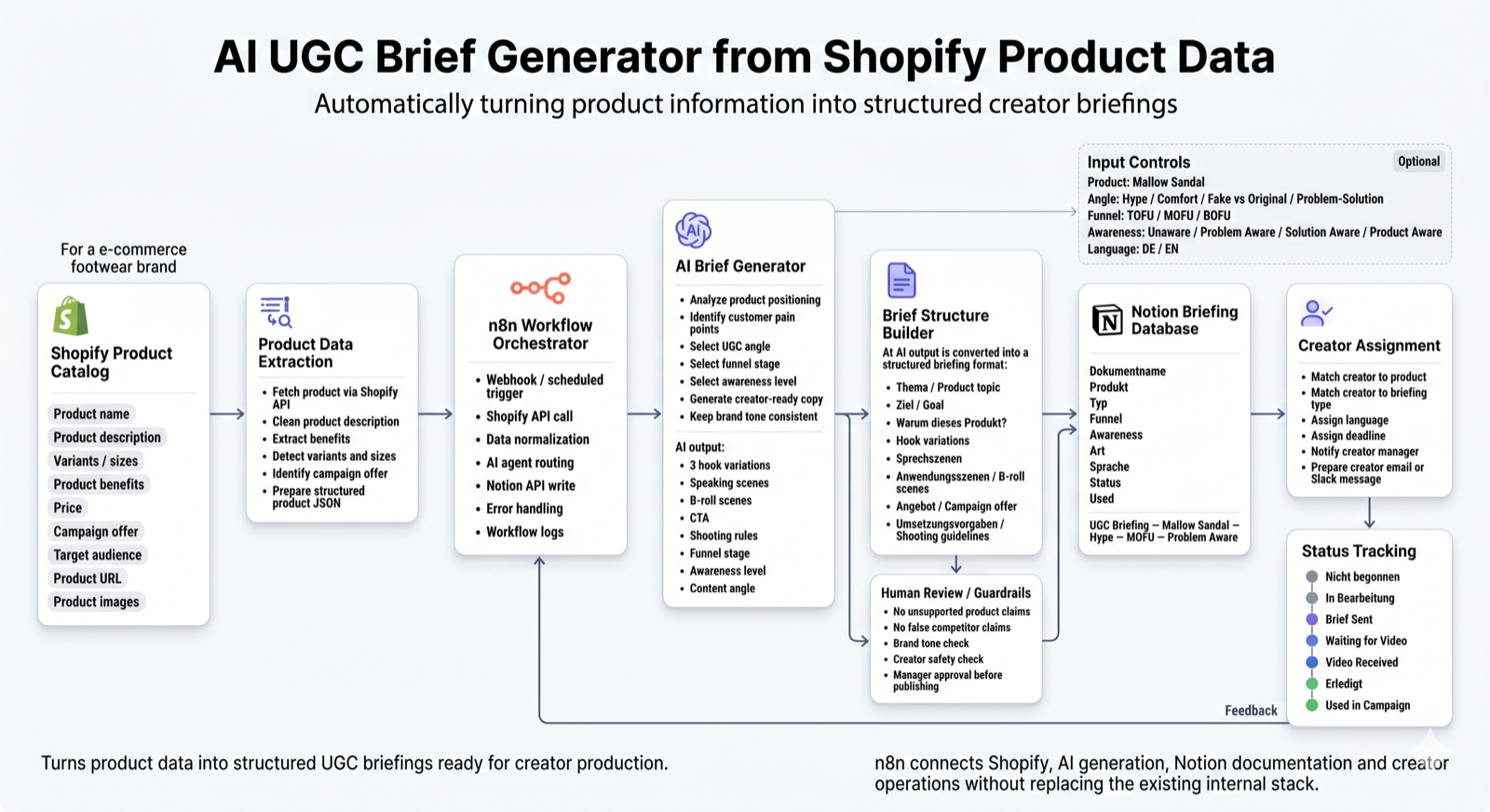
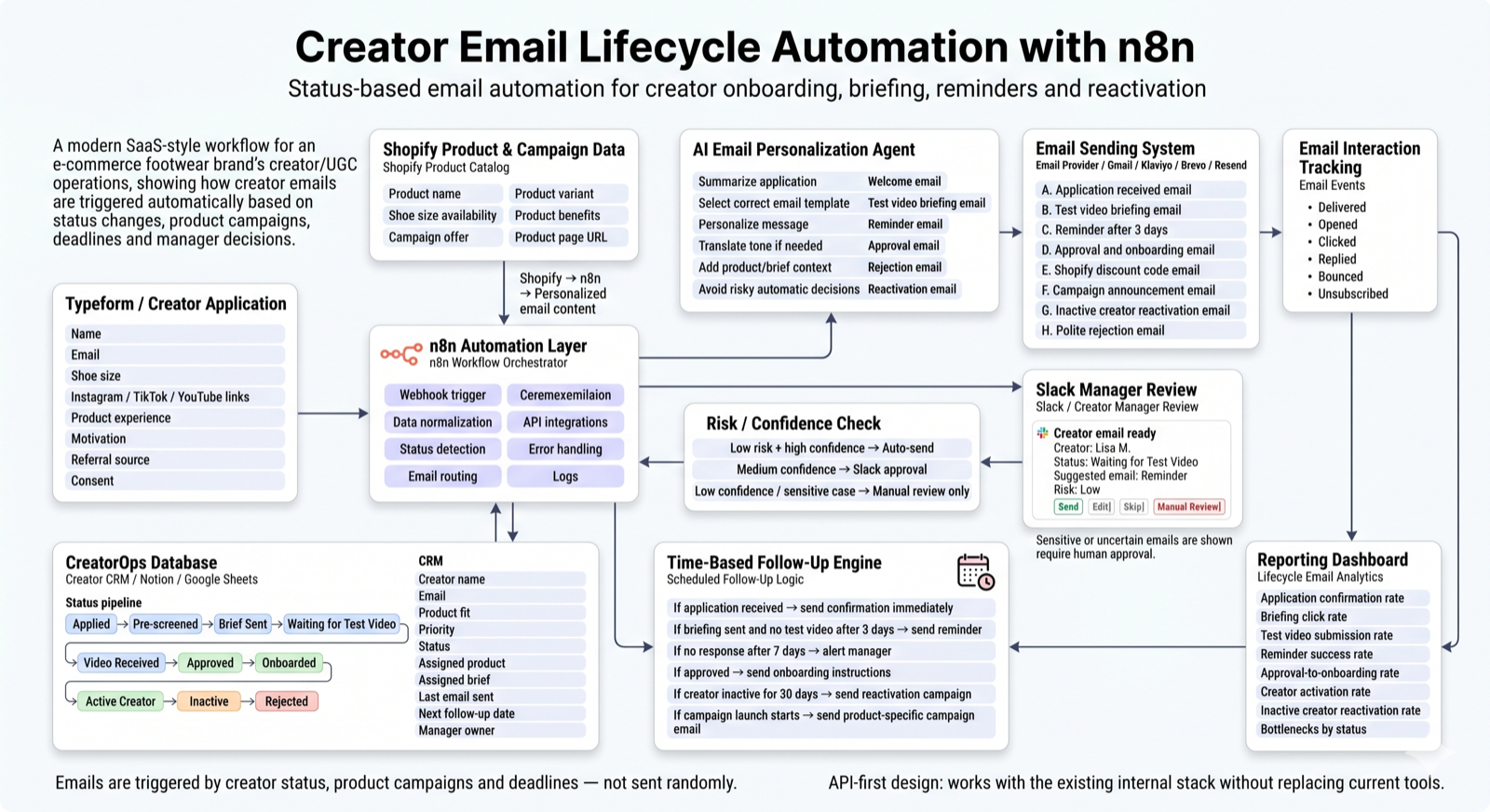
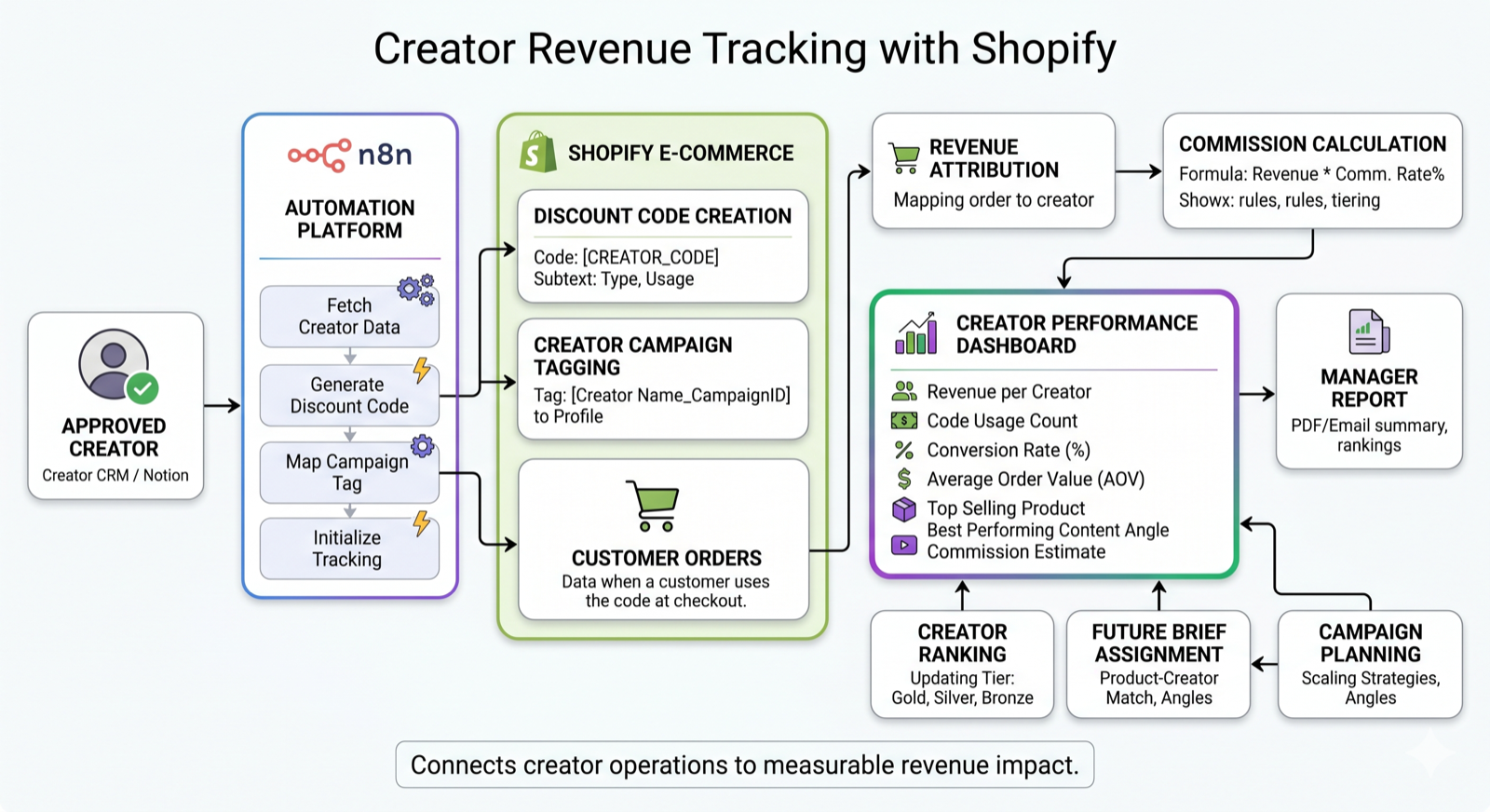
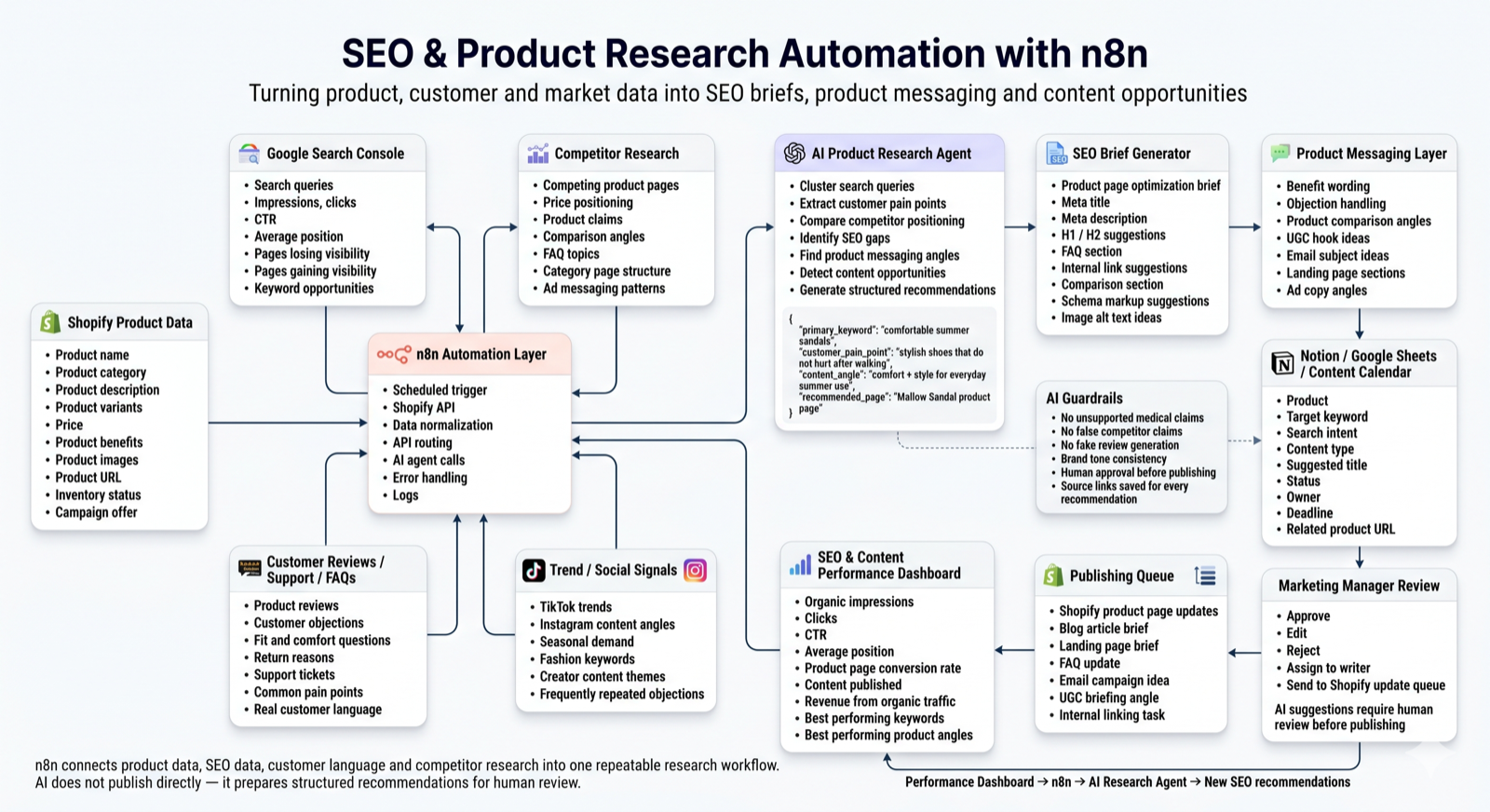
Notion Video Ad Briefings database
Structured briefing records designed around the visible Notion fields: Dokumentname, Produkt, Typ, Funnel, Awareness, Art, Sprache, Status, Used.